

Ghost Process
Category: Reverse Engineering
Difficulty: Medium
Challenge Overview
Ghost Process was a reverse engineering challenge that required inspecting a Windows executable to understand how it validated user input. Instead of trying to execute the program blindly, the solution came from analyzing the binary and reproducing its logic.
Approach
Enumerating the Binary
I started by opening the executable in radare2 and listing the available functions:
r2 challenge.exe
aaa
afl
Two functions immediately stood out because of their size and references. After disassembling them, it became clear that one routine performed a comparison against two byte arrays stored in memory.
Recovering the Encoded Data
Using px to inspect the relevant memory locations revealed the encoded byte array together with a four-byte XOR key.
Encoded bytes:
11 5D 24 D0 ...

Key:
42 19 73 E8
Since the key repeated every four bytes, the decoding routine was easy to reproduce with a short Python script.
data = bytes([...])
key = bytes([0x42, 0x19, 0x73, 0xE8])

decoded = bytes(data[i] ^ key[i % 4] for i in range(len(data)))
print(decoded.decode())
The output resembled a flag, but several characters were incorrect:
SDW8{v0e41t3_x3q_c1r35_53nr3m}Recovering the Final Flag
The partially decoded string suggested another layer of obfuscation. Recognizing the pattern, I treated it as a Vigenère cipher using the key volatile.
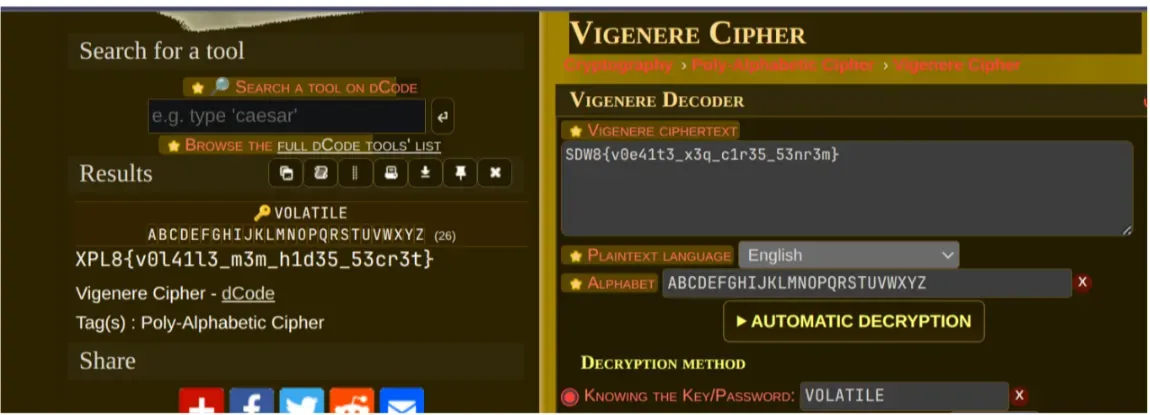
Applying the second decryption step transformed the text into the correct flag.
XPL8{v0l41l3_m3m_h1d35_53cr3t}Conclusion
This challenge combined two simple techniques to discourage a straightforward solution. The first layer relied on a repeating XOR key hidden in the binary, while the second used a Vigenère cipher to disguise the remaining text. By recreating the program’s logic instead of patching the executable, the flag could be recovered with only a few lines of Python.
Flag:
XPL8{v0l41l3_m3m_h1d35_53cr3t}